Results

rss

Description of this article

This is an automatically generated article to help you get started with Live Articles. You can delete this article anytime from Manage Articles > articles

Thank you for installing Live Articles.

Let�s spend few minutes configuring your new article:

  • Permissions


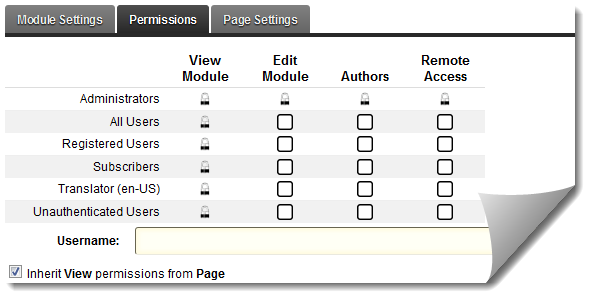
    Grant the �Authors� permission to those who can write a new article and manage their own article through the Live Articles module.

    Grant the �Remote Access� permission to those authors who can write a new article remotely using Live Writer or other such software client.

    Note: �Remote Access� requires that user is an �Author�. �Remote Access� permission does not add any value on its own.

  • Settings

    Begin by specifying the article name, description, theme and its features.
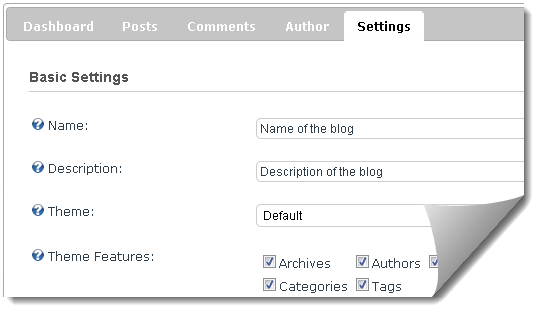


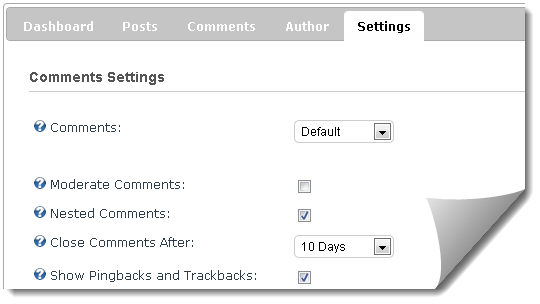
    If you prefer to use Live Article�s built-in comments then you may want to specify whether the comments should be moderated, after how long should the comments automatically close, and other settings via Settings > Comments


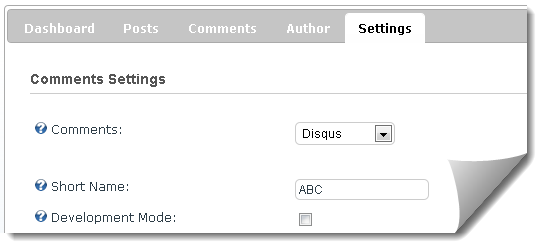
    We strongly recommend using Disqus Comments due to its social networking features instead of built-in Live Article�s comments. If you would like to use disqus then simply create an account at http://www.disqus.com and setup your site�s shortname.

    In Settings > Comments, switch to Disqus and provide your site�s shortname.


    You can return to disqus.com to learn more and to manage your article�s comments.

  • That's it! It�s time to write your first article. From dashboard, click on �Write New Article

This is an automatically generated article to help you get started with Live Articles. You can delete this article anytime from Manage Articles > articles

Thank you for installing Live Articles.

Let�s spend few minutes configuring your new article:

  • Permissions


    Grant the �Authors� permission to those who can write a new article and manage their own article through the Live Articles module.

    Grant the �Remote Access� permission to those authors who can write a new article remotely using Live Writer or other such software client.

    Note: �Remote Access� requires that user is an �Author�. �Remote Access� permission does not add any value on its own.

  • Settings

    Begin by specifying the article name, description, theme and its features.


    If you prefer to use Live Article�s built-in comments then you may want to specify whether the comments should be moderated, after how long should the comments automatically close, and other settings via Settings > Comments


    We strongly recommend using Disqus Comments due to its social networking features instead of built-in Live Article�s comments. If you would like to use disqus then simply create an account at http://www.disqus.com and setup your site�s shortname.

    In Settings > Comments, switch to Disqus and provide your site�s shortname.


    You can return to disqus.com to learn more and to manage your article�s comments.

  • That's it! It�s time to write your first article. From dashboard, click on �Write New Article

This is an automatically generated article to help you get started with Live Articles. You can delete this article anytime from Manage Articles > articles

Thank you for installing Live Articles.

Let�s spend few minutes configuring your new article:

  • Permissions


    Grant the �Authors� permission to those who can write a new article and manage their own article through the Live Articles module.

    Grant the �Remote Access� permission to those authors who can write a new article remotely using Live Writer or other such software client.

    Note: �Remote Access� requires that user is an �Author�. �Remote Access� permission does not add any value on its own.

  • Settings

    Begin by specifying the article name, description, theme and its features.


    If you prefer to use Live Article�s built-in comments then you may want to specify whether the comments should be moderated, after how long should the comments automatically close, and other settings via Settings > Comments


    We strongly recommend using Disqus Comments due to its social networking features instead of built-in Live Article�s comments. If you would like to use disqus then simply create an account at http://www.disqus.com and setup your site�s shortname.

    In Settings > Comments, switch to Disqus and provide your site�s shortname.


    You can return to disqus.com to learn more and to manage your article�s comments.

  • That's it! It�s time to write your first article. From dashboard, click on �Write New Article

This is an automatically generated article to help you get started with Live Articles. You can delete this article anytime from Manage Articles > articles

Thank you for installing Live Articles.

Let�s spend few minutes configuring your new article:

  • Permissions


    Grant the �Authors� permission to those who can write a new article and manage their own article through the Live Articles module.

    Grant the �Remote Access� permission to those authors who can write a new article remotely using Live Writer or other such software client.

    Note: �Remote Access� requires that user is an �Author�. �Remote Access� permission does not add any value on its own.

  • Settings

    Begin by specifying the article name, description, theme and its features.


    If you prefer to use Live Article�s built-in comments then you may want to specify whether the comments should be moderated, after how long should the comments automatically close, and other settings via Settings > Comments


    We strongly recommend using Disqus Comments due to its social networking features instead of built-in Live Article�s comments. If you would like to use disqus then simply create an account at http://www.disqus.com and setup your site�s shortname.

    In Settings > Comments, switch to Disqus and provide your site�s shortname.


    You can return to disqus.com to learn more and to manage your article�s comments.

  • That's it! It�s time to write your first article. From dashboard, click on �Write New Article

This is an automatically generated article to help you get started with Live Articles. You can delete this article anytime from Manage Articles > articles

Thank you for installing Live Articles.

Let�s spend few minutes configuring your new article:

  • Permissions


    Grant the �Authors� permission to those who can write a new article and manage their own article through the Live Articles module.

    Grant the �Remote Access� permission to those authors who can write a new article remotely using Live Writer or other such software client.

    Note: �Remote Access� requires that user is an �Author�. �Remote Access� permission does not add any value on its own.

  • Settings

    Begin by specifying the article name, description, theme and its features.


    If you prefer to use Live Article�s built-in comments then you may want to specify whether the comments should be moderated, after how long should the comments automatically close, and other settings via Settings > Comments


    We strongly recommend using Disqus Comments due to its social networking features instead of built-in Live Article�s comments. If you would like to use disqus then simply create an account at http://www.disqus.com and setup your site�s shortname.

    In Settings > Comments, switch to Disqus and provide your site�s shortname.


    You can return to disqus.com to learn more and to manage your article�s comments.

  • That's it! It�s time to write your first article. From dashboard, click on �Write New Article

This is an automatically generated article to help you get started with Live Articles. You can delete this article anytime from Manage Articles > articles

Thank you for installing Live Articles.

Let�s spend few minutes configuring your new article:

  • Permissions


    Grant the �Authors� permission to those who can write a new article and manage their own article through the Live Articles module.

    Grant the �Remote Access� permission to those authors who can write a new article remotely using Live Writer or other such software client.

    Note: �Remote Access� requires that user is an �Author�. �Remote Access� permission does not add any value on its own.

  • Settings

    Begin by specifying the article name, description, theme and its features.


    If you prefer to use Live Article�s built-in comments then you may want to specify whether the comments should be moderated, after how long should the comments automatically close, and other settings via Settings > Comments


    We strongly recommend using Disqus Comments due to its social networking features instead of built-in Live Article�s comments. If you would like to use disqus then simply create an account at http://www.disqus.com and setup your site�s shortname.

    In Settings > Comments, switch to Disqus and provide your site�s shortname.


    You can return to disqus.com to learn more and to manage your article�s comments.

  • That's it! It�s time to write your first article. From dashboard, click on �Write New Article

This is an automatically generated article to help you get started with Live Articles. You can delete this article anytime from Manage Articles > articles

Thank you for installing Live Articles.

Let�s spend few minutes configuring your new article:

  • Permissions


    Grant the �Authors� permission to those who can write a new article and manage their own article through the Live Articles module.

    Grant the �Remote Access� permission to those authors who can write a new article remotely using Live Writer or other such software client.

    Note: �Remote Access� requires that user is an �Author�. �Remote Access� permission does not add any value on its own.

  • Settings

    Begin by specifying the article name, description, theme and its features.


    If you prefer to use Live Article�s built-in comments then you may want to specify whether the comments should be moderated, after how long should the comments automatically close, and other settings via Settings > Comments


    We strongly recommend using Disqus Comments due to its social networking features instead of built-in Live Article�s comments. If you would like to use disqus then simply create an account at http://www.disqus.com and setup your site�s shortname.

    In Settings > Comments, switch to Disqus and provide your site�s shortname.


    You can return to disqus.com to learn more and to manage your article�s comments.

  • That's it! It�s time to write your first article. From dashboard, click on �Write New Article

This is an automatically generated article to help you get started with Live Articles. You can delete this article anytime from Manage Articles > articles

Thank you for installing Live Articles.

Let�s spend few minutes configuring your new article:

  • Permissions


    Grant the �Authors� permission to those who can write a new article and manage their own article through the Live Articles module.

    Grant the �Remote Access� permission to those authors who can write a new article remotely using Live Writer or other such software client.

    Note: �Remote Access� requires that user is an �Author�. �Remote Access� permission does not add any value on its own.

  • Settings

    Begin by specifying the article name, description, theme and its features.


    If you prefer to use Live Article�s built-in comments then you may want to specify whether the comments should be moderated, after how long should the comments automatically close, and other settings via Settings > Comments


    We strongly recommend using Disqus Comments due to its social networking features instead of built-in Live Article�s comments. If you would like to use disqus then simply create an account at http://www.disqus.com and setup your site�s shortname.

    In Settings > Comments, switch to Disqus and provide your site�s shortname.


    You can return to disqus.com to learn more and to manage your article�s comments.

  • That's it! It�s time to write your first article. From dashboard, click on �Write New Article

This is an automatically generated article to help you get started with Live Articles. You can delete this article anytime from Manage Articles > articles

Thank you for installing Live Articles.

Let�s spend few minutes configuring your new article:

  • Permissions


    Grant the �Authors� permission to those who can write a new article and manage their own article through the Live Articles module.

    Grant the �Remote Access� permission to those authors who can write a new article remotely using Live Writer or other such software client.

    Note: �Remote Access� requires that user is an �Author�. �Remote Access� permission does not add any value on its own.

  • Settings

    Begin by specifying the article name, description, theme and its features.


    If you prefer to use Live Article�s built-in comments then you may want to specify whether the comments should be moderated, after how long should the comments automatically close, and other settings via Settings > Comments


    We strongly recommend using Disqus Comments due to its social networking features instead of built-in Live Article�s comments. If you would like to use disqus then simply create an account at http://www.disqus.com and setup your site�s shortname.

    In Settings > Comments, switch to Disqus and provide your site�s shortname.


    You can return to disqus.com to learn more and to manage your article�s comments.

  • That's it! It�s time to write your first article. From dashboard, click on �Write New Article

This is an automatically generated article to help you get started with Live Articles. You can delete this article anytime from Manage Articles > articles

Thank you for installing Live Articles.

Let�s spend few minutes configuring your new article:

  • Permissions


    Grant the �Authors� permission to those who can write a new article and manage their own article through the Live Articles module.

    Grant the �Remote Access� permission to those authors who can write a new article remotely using Live Writer or other such software client.

    Note: �Remote Access� requires that user is an �Author�. �Remote Access� permission does not add any value on its own.

  • Settings

    Begin by specifying the article name, description, theme and its features.


    If you prefer to use Live Article�s built-in comments then you may want to specify whether the comments should be moderated, after how long should the comments automatically close, and other settings via Settings > Comments


    We strongly recommend using Disqus Comments due to its social networking features instead of built-in Live Article�s comments. If you would like to use disqus then simply create an account at http://www.disqus.com and setup your site�s shortname.

    In Settings > Comments, switch to Disqus and provide your site�s shortname.


    You can return to disqus.com to learn more and to manage your article�s comments.

  • That's it! It�s time to write your first article. From dashboard, click on �Write New Article